| Member Resources |
Supra EKEY App
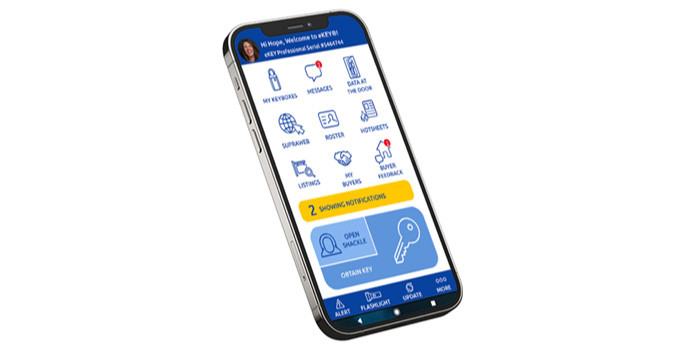
The Supra® EKEY uses Bluetooth® to turn your smart phone or tablet into your key, and will open boxes even in areas with poor cell signal. Because the EKEY app uses Bluetooth® signal to open lockboxes, it works even in areas with poor or no cell signal. You just need to update your EKEY by opening the app using wifi or cell signal before going out to view listings.
Supra® EKEY App Resources »
How to obtain Supra® EKEY service with SAMCAR:
-
Complete a Supra Key Agreement
 and submit to samcar@samcar.org (please include a telephone number in your email so staff may reach out to you for payment of the key fee)
-
Please refer to the "REALTOR® Membership Dues" Schedule on the REALTOR® Membership page for associated fees.
-
-
Download the Supra® EKEY app from the Apple® App Store (iPhone®) or Google Play Store (Android™).
-
SAMCAR staff will provide you with a 30-digit authorization code upon receipt of key fee payment and confirmation of your active MLSListings subscription.
-
(iPhone) Pair the fob with the Bluetooth® on your phone. The fob is a separate item available for purchase from SAMCAR.
-
The eKey app updates automatically when you open the app (Recommended: Open the app at home or office prior to visiting listings, the update requires cell signal or wifi).


Authorize the EKEY App on a new device:
Whenever you download the EKEY app on a new device, you will need a new 30-digit authorization code.
If you need a Supra® activation code, please Contact Us and staff will follow up with you during normal business hours. If it is an urgent need, you may also contact Supra® Support.
Supra® Support 1-877-699-6787
Where does my Supra® EKEY work?
Supra® EKEY Coverage Area
Supra EKEY Homepage »
EKEY & SupraWEB Enhancements 
IMPORTANT! It is a violation of the Supra® Keyholder Agreement to lend or share your Supra® Key. SAMCAR will impose a FINE of $1,000 to anyone lending or sharing their key. ONLY the keyholder may use or be in possession of the key. |